
How to Build a WhatsApp AI Agent for a Recruitment Agency
Let candidates check open roles, apply with their CV and track their application on WhatsApp, with every job and application kept in a tracker your recruiters use.

A recruitment agency can run its candidate conversations on WhatsApp through an AI agent. Candidates ask what roles are open, apply by sending their CV in the chat, and come back later to ask how their application is going. The agent lists the open jobs from a tracker app your recruiters keep up to date, saves each application with the CV into that same tracker, and reads the current status back when a candidate asks. This guide builds that setup in QX step by step for a made-up agency, Brightway Recruitment in Manchester, which fills warehouse, driving and office roles.
For the basics of WhatsApp agents, start with the general guide to WhatsApp AI agents for customer service. This guide adds the piece that makes recruitment different: one place where jobs and applications live, which both the agent and your recruiters work from.
Key takeaways
- Candidates can do three things on WhatsApp: check open roles, apply with a CV, and check their application status.
- Jobs and applications both live in a tracker app, a QX Space, that QX builds for you with sign-in and a database.
- The agent uses three Space actions: one lists the open jobs, one adds an application with the CV attached, and one looks up an application's status.
- When a recruiter marks a job as filled in the tracker, the agent stops offering it straight away. There is no separate jobs list to keep in sync.
- Visa and right-to-work questions, employer enquiries and data requests go to a person. Right-to-work checks are a legal duty, not a chat topic.
What can candidates do?
| A candidate says | The agent |
|---|---|
| "Any warehouse jobs near Trafford Park?" | Lists the open jobs from the tracker that match: role, location, pay and shifts |
| "I'd like to apply for the forklift driver job" (and sends a CV) | Asks for any missing details, then adds the application to the tracker with the CV attached |
| "Any update on my application?" | Looks up their application in the tracker and tells them its status |
Everything else, from employers wanting staff to questions about visas, goes to a recruiter.
How do the pieces fit together?
- The tracker is a QX Space: a small web app with a sign-in, a database and its own web address. It has two parts. Jobs holds every role with its reference, details and whether it is Open or Filled. Applications holds each candidate's details, the job they applied for, their CV and a status.
- Three Space actions connect the agent to the tracker. What a Space action does depends on how you set it up, so you create one to list open jobs, one to submit applications and one to check status.
- A candidate FAQ is the agent's knowledge: how registration works, how quickly you reply, and for temps, pay day and timesheets.
- Recruiters sign in to the tracker to add and close jobs, read new applications and CVs, and update each status as the candidate moves forward.
What you need before you start
- Your open roles, each with a reference, location, pay, hours or shifts, and what the role needs.
- The details you want from every applicant: name, phone number, email, the job, when they can start.
- Your stages, for example New, Shortlisted, Interview, Offered and Not progressed.
- A recruiter's contact details for anything the agent should not handle.
Step 1: Build the tracker
Start with the tracker, because all three actions read from it or write to it. In QX chat, describe the app you want:
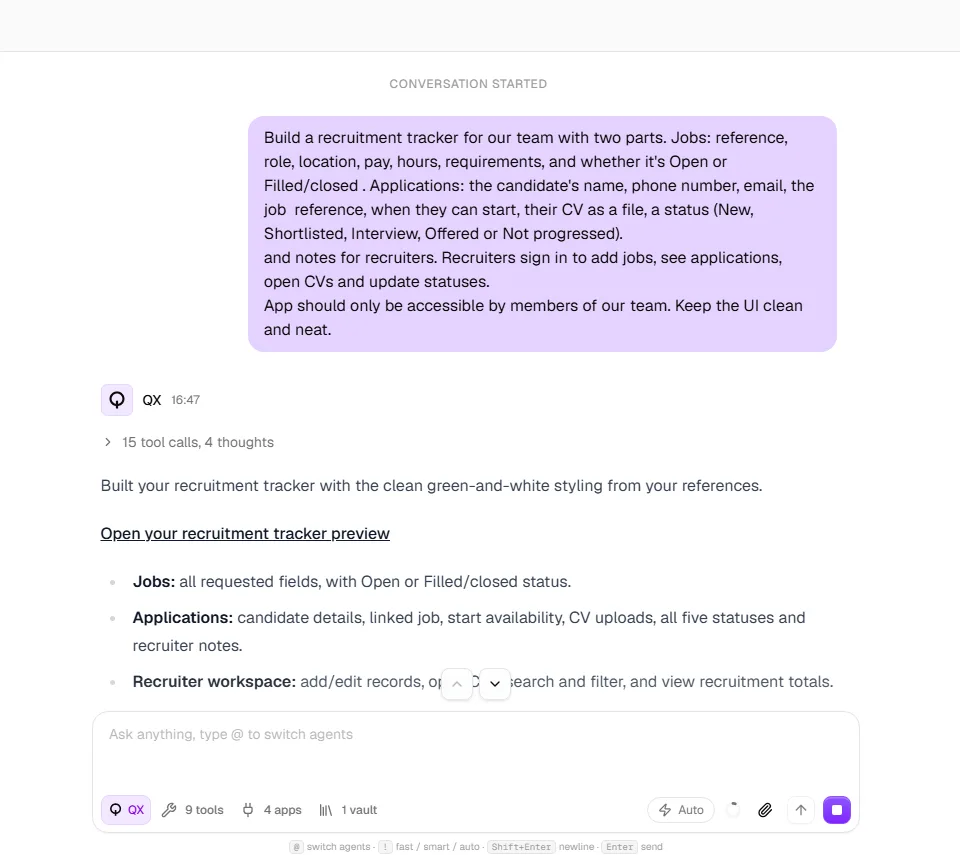
Build a recruitment tracker for our team with two parts. Jobs: reference, role, location, pay, hours, requirements, and whether it's Open or Filled. Applications: the candidate's name, phone number, email, the job reference, when they can start, their CV as a file, a status (New, Shortlisted, Interview, Offered or Not progressed) and notes for recruiters. Recruiters sign in to add jobs, see applications, open CVs and update statuses. Only members of our team should be able to use the app. Keep the design clean and neat.
QX builds the app, tests it and replies with a link. It comes with a sign-in, a database and its own address, and it starts private to you. Share it with your recruiters from its Access tab. Because it holds candidates' personal details, keep it to your team and leave Anyone with the link switched off.
The free plan includes one Space, and Pro and Enterprise plans include as many as you need. The Spaces docs cover sharing and sign-in in more detail.
Step 2: Add your open jobs
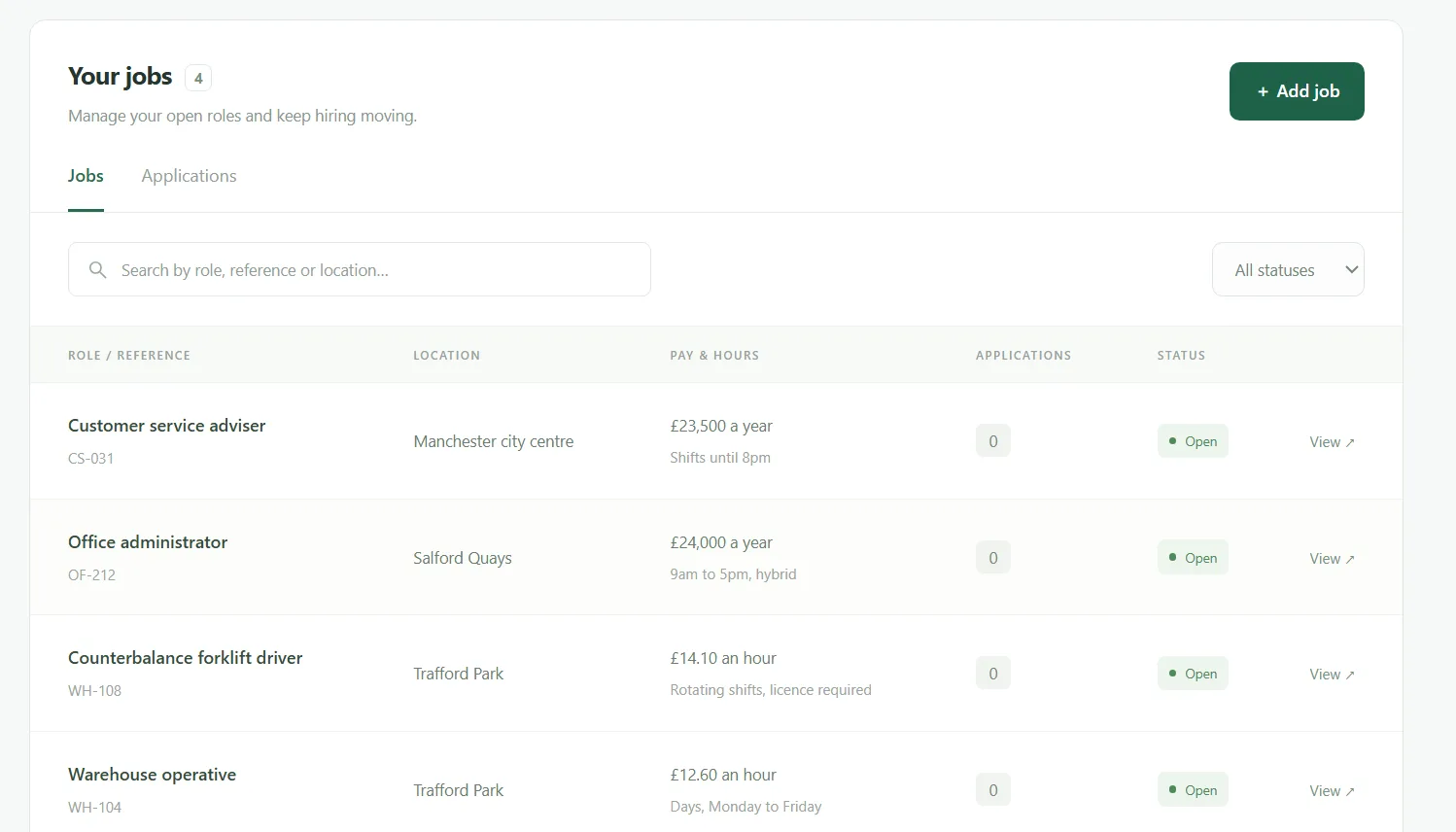
Add your current roles to the Jobs part of the tracker, with the details candidates ask about:
| Ref | Role | Location | Pay | Hours | Status |
|---|---|---|---|---|---|
| WH-104 | Warehouse operative | Trafford Park | £12.60 an hour | Days, Monday to Friday | Open |
| WH-108 | Counterbalance forklift driver | Trafford Park | £14.10 an hour | Rotating shifts, licence required | Open |
| OF-212 | Office administrator | Salford Quays | £24,000 a year | 9am to 5pm, hybrid | Open |
| CS-031 | Customer service adviser | Manchester city centre | £23,500 a year | Shifts until 8pm | Open |
An example set of jobs for this guide.
From now on, the tracker is the only jobs list. When a role is filled, a recruiter changes its status to Filled and the agent stops offering it on the next message. Nobody has to remember to update a document as well.
Then add a short candidate FAQ to the agent's knowledge: how registration works, how quickly you usually reply, and for temps, when pay day is and how timesheets work.
Step 3: Describe the agent
Go to Agents, then New Agent, and choose External. In the Chat sidebar, describe what the agent should do:
We're Brightway Recruitment in Manchester. Candidates message us on WhatsApp about warehouse, driving and office jobs. When someone asks about jobs, list our open jobs from the tracker. When someone wants to apply, collect their name, email, the job reference and when they can start, ask for their CV, and add the application to the tracker. When someone asks about their application, look it up and tell them the status. For employers, and anyone asking about visas or right to work, give Aisha's email, aisha@brightway.example. Use our existing tracker app.
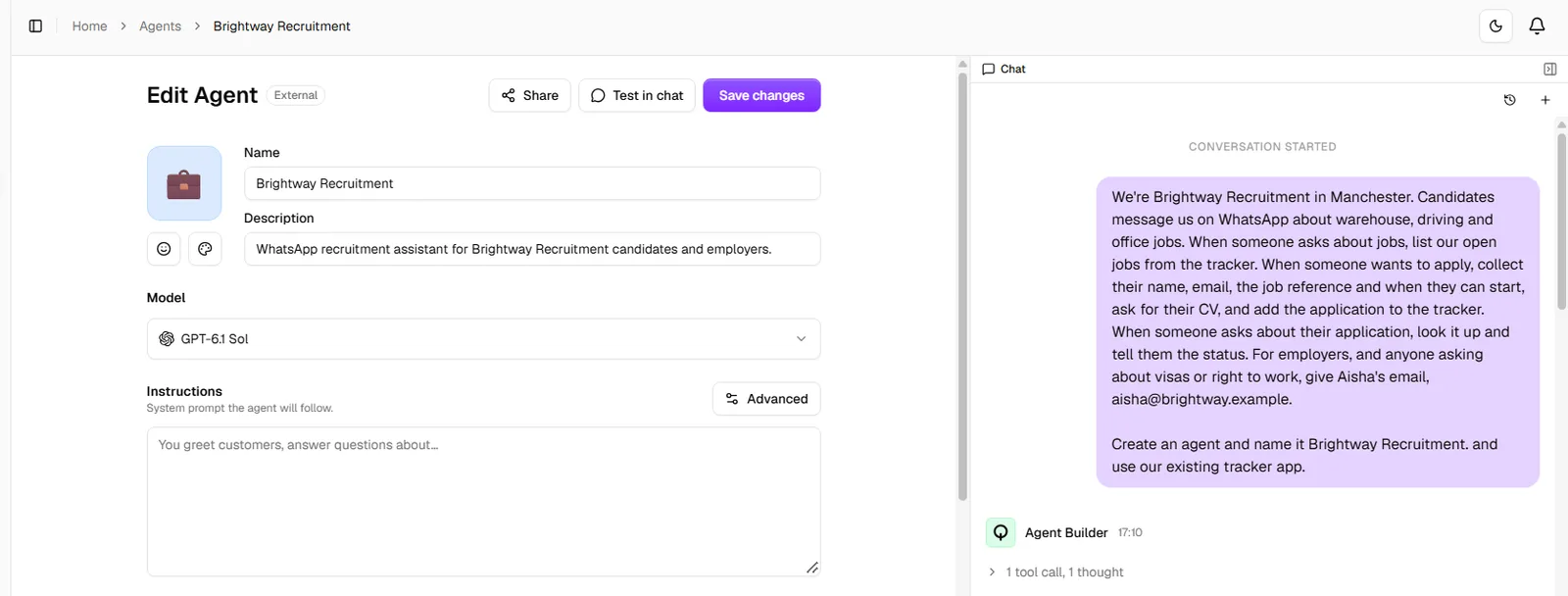
QX drafts the instructions from that, and asks about anything unclear. The draft covers the agent's role, how it talks to candidates, what it must never share, such as recruiter notes or another candidate's details, and when to point people to Aisha's email.
Step 4: Describe the three Space actions
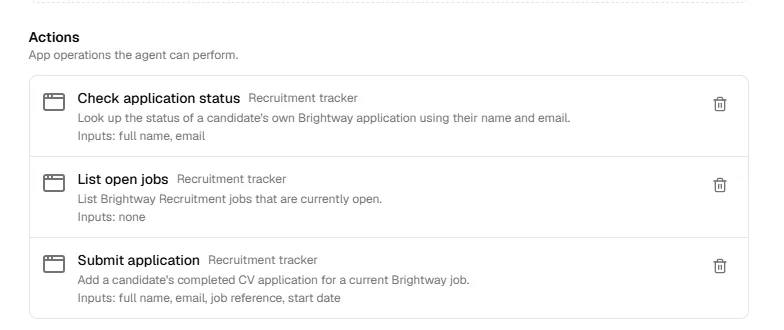
Tell the builder in the Chat sidebar what the agent should be able to do with the tracker: list the open jobs, add an application with the CV, and look up an application's status. It sets up each action for you to review. Each action is one task, fixed to your tracker, and the agent fills in the candidate's details and nothing else.
| Action | What it does | What the agent fills in |
|---|---|---|
| List open jobs | Returns the jobs marked Open, with reference, role, location, pay and hours | Nothing. The agent picks the jobs that match what the candidate asked |
| Submit application | Adds a new application with the status New, with the CV the candidate sent in the chat | Full name, email, job reference, start date |
| Check application status | Finds the candidate's own application and returns its role and status | The full name and email they applied with |
Two of these deserve care:
- List open jobs should return job details only. It never needs to touch the Applications part of the tracker.
- Check application status should return only the role and the status, never recruiter notes, and it should look up the application from the name and email the candidate applied with.
Then add a line to the instructions:
Only ever share the status of the person's own application. Never share recruiter notes or anything about another candidate. Only offer jobs that the tracker lists as Open.
Step 5: Tell it when to send people to a recruiter
Some conversations belong with a recruiter. Write them into the instructions in your own words:
If someone asks about visas, sponsorship or whether they have the right to work in the UK, don't advise. Say a recruiter will go through the right-to-work check with them, and give Aisha's email, aisha@brightway.example.
If a business wants to hire staff, thank them and give Aisha's email.
If a candidate asks why they weren't shortlisted, say their recruiter will get in touch, and don't guess.
If someone asks us to delete their details, say we'll handle it and give Aisha's email.
Right-to-work checks are a legal duty for employers, carried out before someone starts work, with civil penalties of up to £60,000 per illegal worker, according to the Home Office's guidance for employers. That is a job for a recruiter with the candidate's documents in front of them, not for a chat.
Step 6: Test it
Click Test in chat and try these before you link your number:
| Test | What a good answer looks like |
|---|---|
| "Any warehouse jobs near Trafford Park?" | The two open Trafford Park roles, with pay and shifts |
| "I want to apply for WH-108" and a CV | Asks for anything missing, confirms, and a new application appears in the tracker with the CV attached |
| "Any update on my application?" | Looks it up and gives the status your recruiter set |
| "How's Jamie Patel's application going?" | Declines politely. It only shares a person's own application |
| "I'm on a student visa, can I work full time?" | No advice. Points them to a recruiter |
| "We need 10 pickers for peak season" | Treats it as an employer and gives Aisha's email |
| "Is the warehouse supervisor job still open?" | Says it isn't among the open jobs |
In our test, "Any warehouse jobs near Trafford Park?" returned exactly the two open Trafford Park roles, WH-104 and WH-108, with pay and shifts, and the agent asked which one the candidate wanted to apply for.
Then test that the tracker really is the source of truth. Mark WH-104 as Filled and ask about warehouse jobs again: the agent should now offer only WH-108. Open the test application and check it has the right job reference, the status New and a CV you can open. Change its status to Shortlisted and ask the agent again: it should give the new status.
Step 7: Link your number
When the tests pass, open the agent's WhatsApp number section, enter the number candidates message and click Connect, then enter the pairing code on the phone under Settings, then Linked devices. The general guide shows each screen.
What does applying look like for a candidate?
A candidate messages asking about customer service jobs. The agent lists CS-031, the customer service adviser role in Manchester city centre, from the tracker, and asks if they would like to apply.
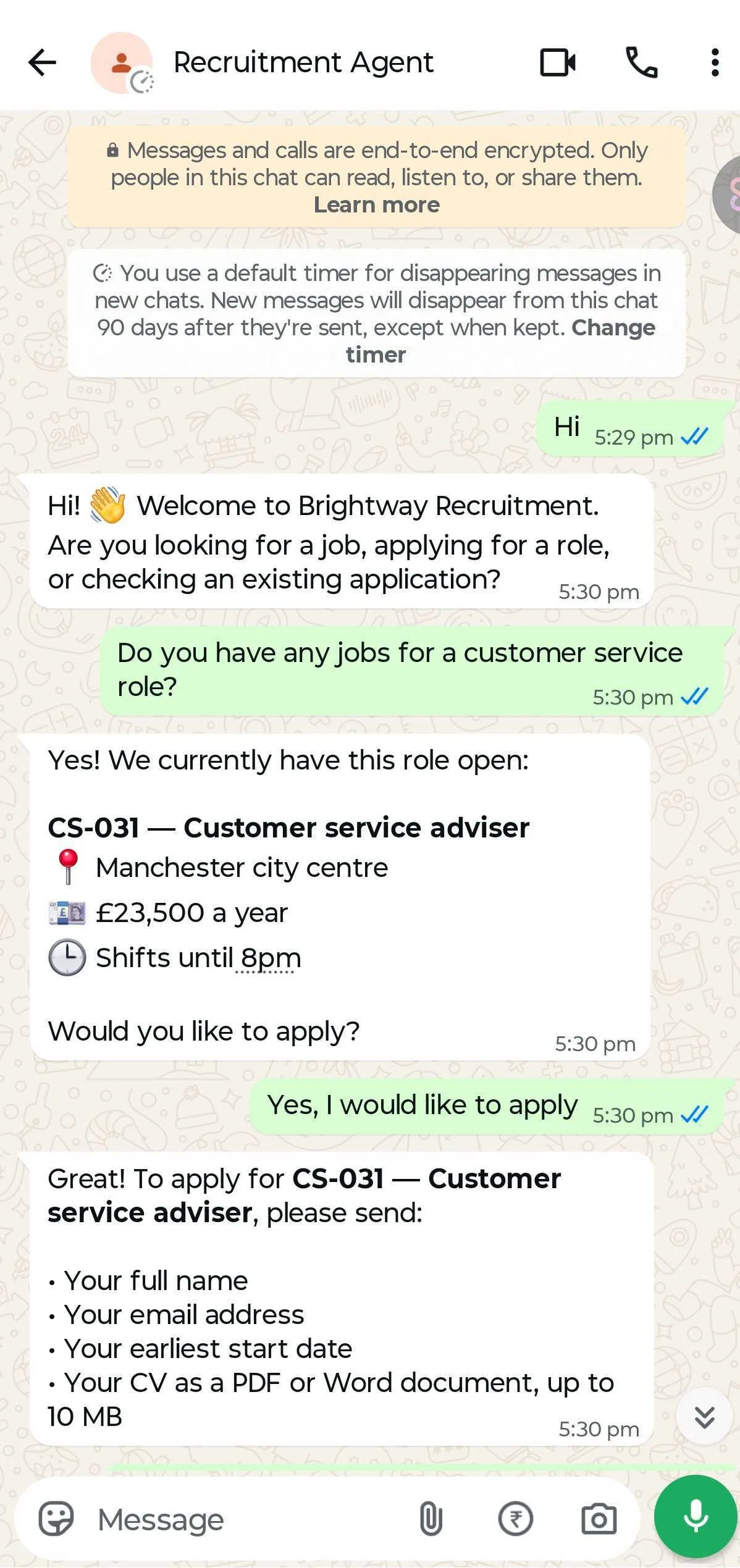
They send their name, email and start date, then their CV as a PDF, and the agent confirms the application.
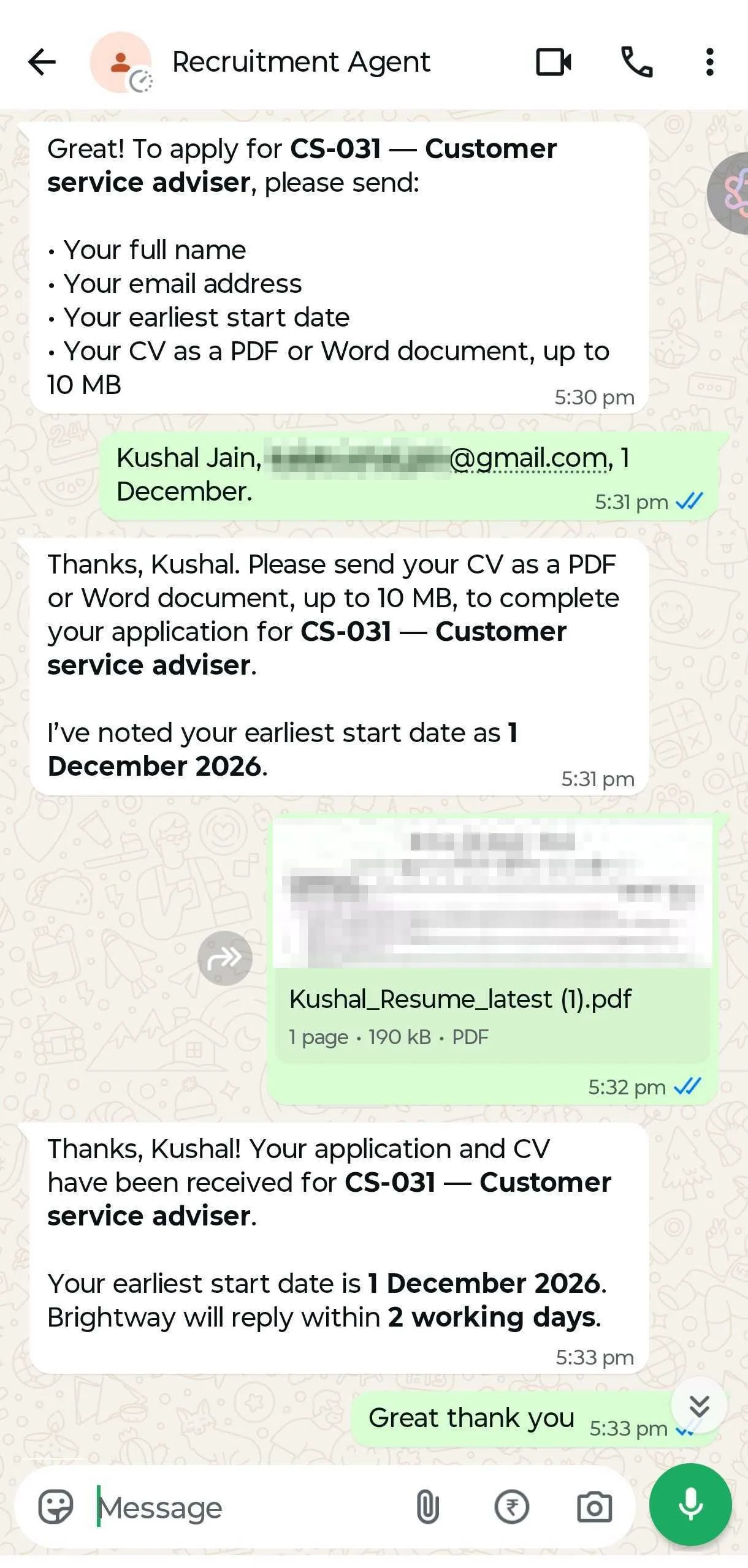
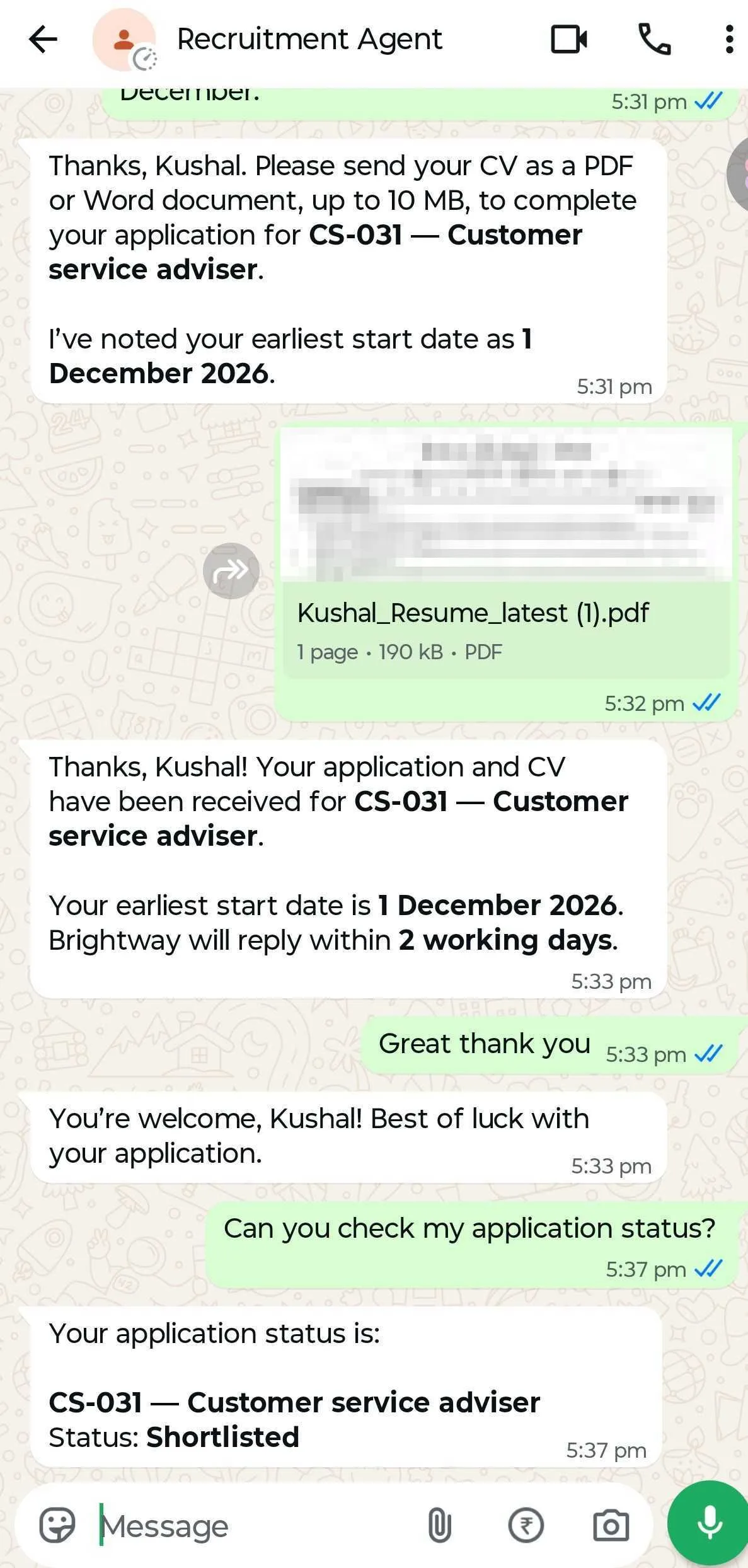
Later they ask for an update, and the agent replies with the status the recruiter set.
What do recruiters see?
Each application lands in the tracker with the candidate's details, the job reference, the status New and the CV they sent on WhatsApp.
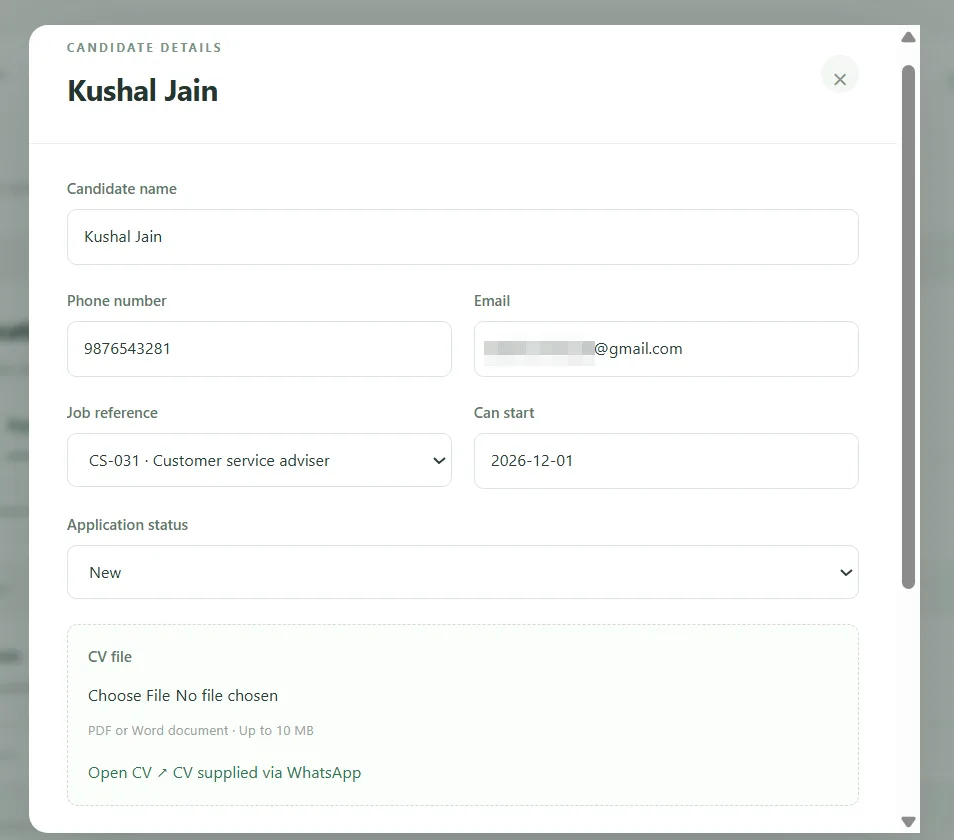
On Monday morning, Aisha signs in to the tracker and finds six new applications from the weekend, each with a CV attached and the role it was for. She shortlists two forklift drivers for WH-108, marks one office application as Not progressed, and books interviews by phone. When WH-104 is filled on Wednesday, she marks it Filled, and from the next message onwards the agent stops offering it.
One thing to know: the agent only replies to messages it receives. It will not tell a candidate when their status changes or when a new job is added. They find out when they ask, or when a recruiter contacts them directly.
If a single role attracts hundreds of applications, a Grid can read every CV against the role's requirements and score them in one run, so recruiters start with the strongest matches.
Keeping candidate data safe
Applications contain personal details, so a few rules are worth following from day one:
- Keep the tracker team-only. Share it with named recruiters or your team, never by public link.
- Collect only what you need. Name, contact details, the job, start date and CV are enough to apply. Leave anything sensitive for a conversation with a recruiter.
- Route deletion requests to a person. The agent should never try to delete data itself.
QX Labs is ISO 27001:2022 certified and does not train AI models on customer data. The Trust Center has the details, and Is it safe to give AI agents access to your tools? covers the wider question.
FAQ
Can candidates apply for jobs on WhatsApp?
Yes. With a Space action connected to your tracker, the agent collects the candidate's details, asks for their CV, and adds the application with the CV attached. Recruiters see it the next time they sign in to the tracker. Candidates never need to fill in a form or create an account.
How does the agent know which jobs are open?
It asks the tracker. A List open jobs action returns the roles your recruiters have marked Open, with their details. When a recruiter marks a role Filled, the agent stops offering it from the next message, so there is no separate jobs document to keep in step with the tracker.
Can the agent read and store CVs?
The agent can take a CV the candidate sends in the chat and upload it into your tracker as part of the application, so recruiters can open it alongside the candidate's details. To screen large numbers of CVs against a role's requirements, a QX Grid can score them all in one run.
How do candidates check their application status?
They ask on WhatsApp. A Space action looks up their application in your tracker by the name and email they applied with, and returns the role and the status your recruiter set, such as Shortlisted. Set the action to return only those two fields, and tell the agent never to share anyone else's application.
Can the agent screen or reject candidates?
Not in this setup. It lists jobs, takes applications and reports status. Shortlisting and rejecting stay with your recruiters, who update the status in the tracker. Keeping people in charge of those decisions is also the safer choice when the outcome matters so much to the candidate.
Can it message candidates about new jobs?
No. A QX WhatsApp agent only replies to messages it receives and never starts a conversation, so it cannot send job alerts or status updates. Candidates see the latest open jobs whenever they ask, and your recruiters contact candidates directly when there is news.
Build yours
See example conversations for recruitment agencies on our WhatsApp page, or start free: build the tracker, add your open jobs, and test an application in chat before you link a number. Every plan includes WhatsApp agents.
More WhatsApp guides: plumbing and heating businesses and hair salons, or explore what else QX Agents can do for your team.
See what AI agents can do for your team
Deploy agents that can act across your data and 1,000+ apps.