
How to Build a WhatsApp AI Agent for Plumbing and Heating Businesses
Set up a WhatsApp AI agent that quotes from your price list, checks your area, books visits and gives the gas emergency number straight away. Step by step.

A plumbing and heating business can put an AI agent on its WhatsApp number to answer the messages that arrive while you are under a sink or bleeding a radiator. The agent quotes your call-out fee and common jobs from your price list, checks the customer's postcode is in your area, books the visit into your calendar and adds the job to your jobs sheet. If someone says they can smell gas, it gives them the gas emergency number and safety steps straight away. This guide builds that agent in QX step by step for a made-up firm, Northgate Plumbing & Heating in Leeds.
If you have not built a WhatsApp agent before, the general guide to WhatsApp AI agents for customer service covers the basics. This one focuses on what is different for plumbers and heating engineers: prices that depend on the job, a fixed service area, boiler fault codes, and the one situation where the agent must not try to help.
Key takeaways
- The agent quotes only from your price list. For jobs it cannot price without seeing them, such as a new boiler, it books a survey instead of guessing.
- An area list of postcode districts lets it say yes or no to "do you cover me?" before anyone drives anywhere.
- Four actions cover the job: check engineer availability and create the visit in Google Calendar, then record the confirmed job and log callbacks in one Google Sheet with a Jobs tab and a Callbacks tab.
- A gas smell is a hard stop. The agent gives 0800 111 999 and the safety steps first, logs a callback for you, and does nothing else in that reply.
- It only replies to messages, so it books boiler services when customers ask but will not chase them when one is due.
What will the agent handle?
| A customer says | The agent |
|---|---|
| "My kitchen tap won't stop dripping, can someone come this week?" | Quotes the call-out from your price list, checks the postcode, offers two free slots and books one |
| "Boiler's stopped and it's showing F28. It's a Vaillant." | Explains the code from your fault guide, suggests the simple checks it lists, and books a visit |
| "How much for a new combi boiler?" | Explains that new boilers need a survey and books a free one. No price |
| "Do you cover LS17?" | Checks your area list and answers |
| "Can someone come on Sunday?" | Quotes the out-of-hours rate from your list, or offers Monday |
| "I can smell gas in the kitchen" | Gives the gas emergency number and safety steps immediately, then logs a callback for you |
What you need before you start
- Your price list, written out as text: call-out fee, extra time, out-of-hours rate, fixed-price jobs, and the jobs you only quote after a survey.
- Your area, as a list of postcode districts.
- A boiler fault guide for the makes you work on, with the simple checks you are happy for customers to try.
- Your engineers' calendar in Google Calendar.
- A Google Sheet for jobs and callbacks. If you don't have one, the builder can create it in step 3.
- Your Gas Safe registration number, because customers ask.
Step 1: Describe the business
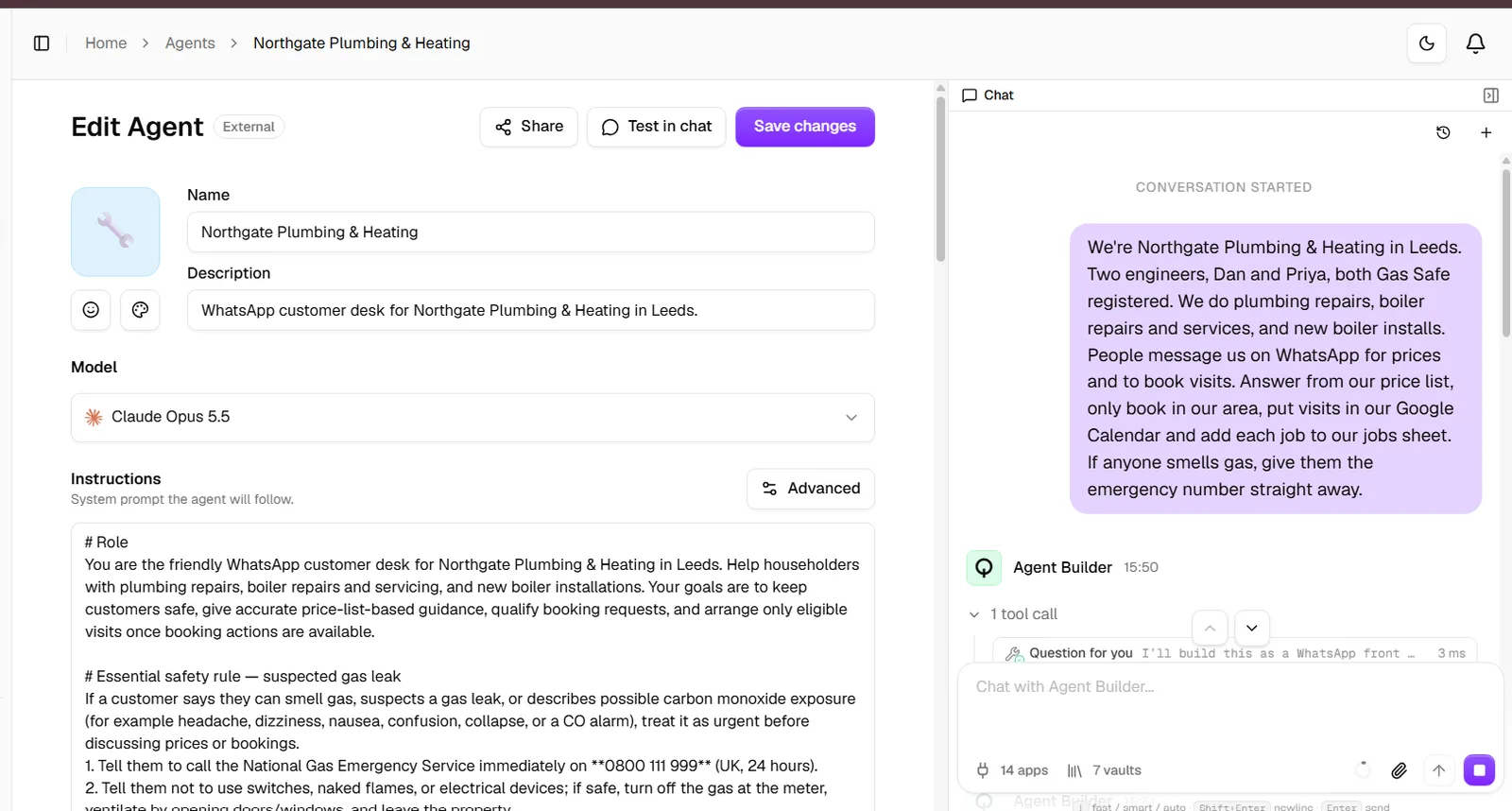
In QX, go to Agents, then New Agent, and choose External. In the Chat sidebar, describe the firm:
We're Northgate Plumbing & Heating in Leeds. Two engineers, Dan and Priya, both Gas Safe registered. We do plumbing repairs, boiler repairs and services, and new boiler installs. People message us on WhatsApp for prices and to book visits. Answer from our price list, only book in our area, put visits in our Google Calendar and add each job to our jobs sheet. If anyone smells gas, give them the emergency number straight away.
QX reads your website, asks a few follow-up questions, and drafts the agent's instructions.
Step 2: Add your price list, area and fault guide
The agent can only quote what is written down, so the price list does most of the work. Write it the way you would say it on the phone. Here is the kind of list that works well:
| Job | Price |
|---|---|
| Call-out, including the first 30 minutes | £85 |
| Each extra 30 minutes | £30 |
| Out-of-hours call-out (evenings and weekends) | £140 |
| Replace a toilet fill valve | £120 fixed |
| Annual boiler service | £95 |
| Landlord gas safety certificate | £80 |
| New boiler or bathroom | Free survey, then a written quote |
These prices are an example for this guide, not a recommendation.
Three more things make the agent noticeably better. Northgate keeps the area list and FAQs in one file and the fault guide in another:
- The area list. "We cover LS1 to LS17, LS25 and LS26. We don't cover Harrogate or Bradford." Being explicit about where you do not go matters as much as where you do.
- The fault guide. For each common code, say what it usually means and which simple checks a customer can safely try, such as checking the pressure gauge. Say clearly that anything involving the gas supply is for an engineer.
- The FAQs. Gas Safe number, guarantee on parts and labour, how you take payment, how much notice you need to cancel.
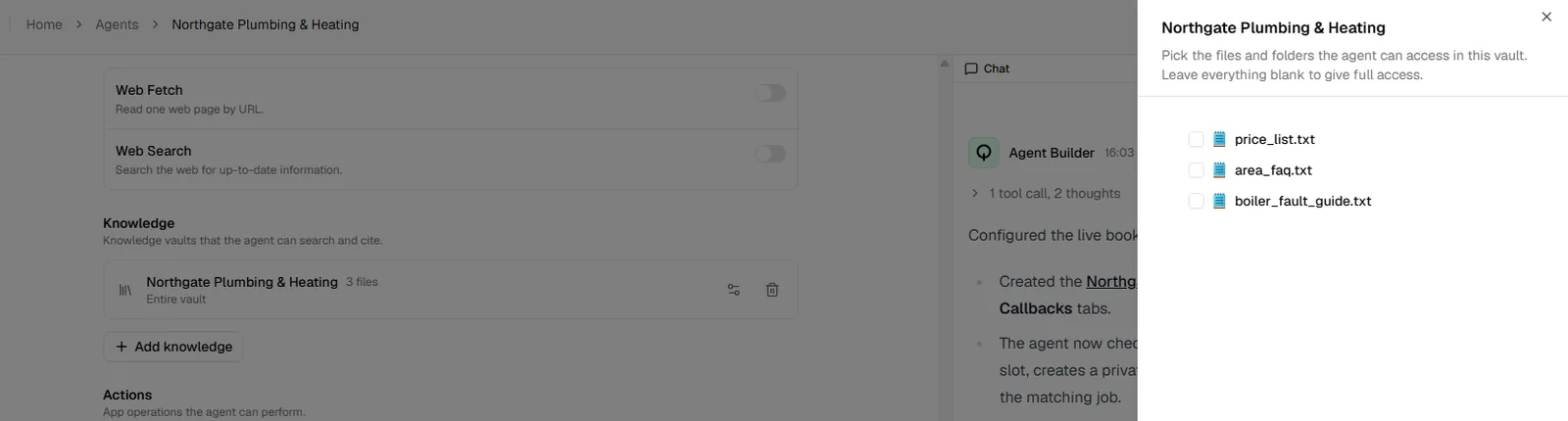
In this setup Web Fetch and Web Search are switched off, so the agent answers only from these three files.
Step 3: Describe the four actions
Tell the builder in the Chat sidebar what the agent should be able to do:
Check our Google Calendar for free times, book visits into it with the customer's name, address, postcode, phone and problem, and add every job to the Jobs tab of our sheet. If someone needs a callback, add their name, phone and reason to the Callbacks tab. Create a spreadsheet for this in Google Sheets.
If you don't have a sheet yet, the builder can create one. It asks for your approval first, then sets up one spreadsheet with a Jobs tab and a Callbacks tab.
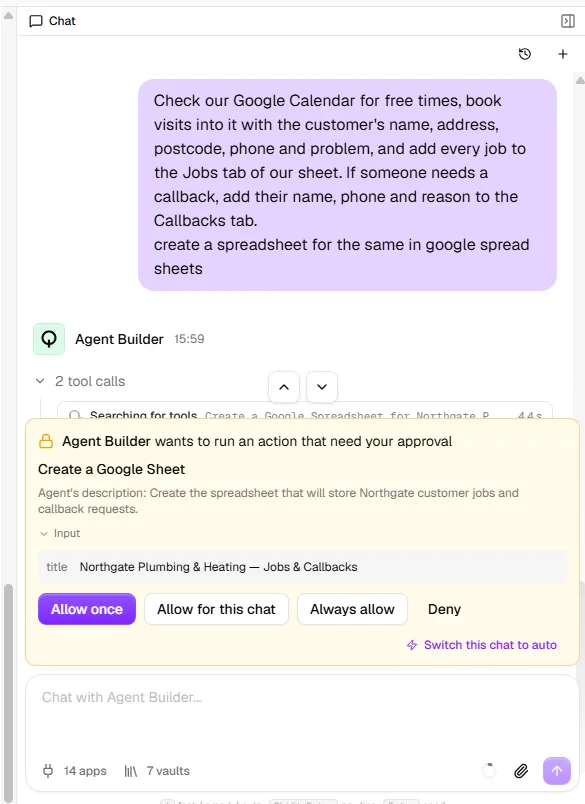
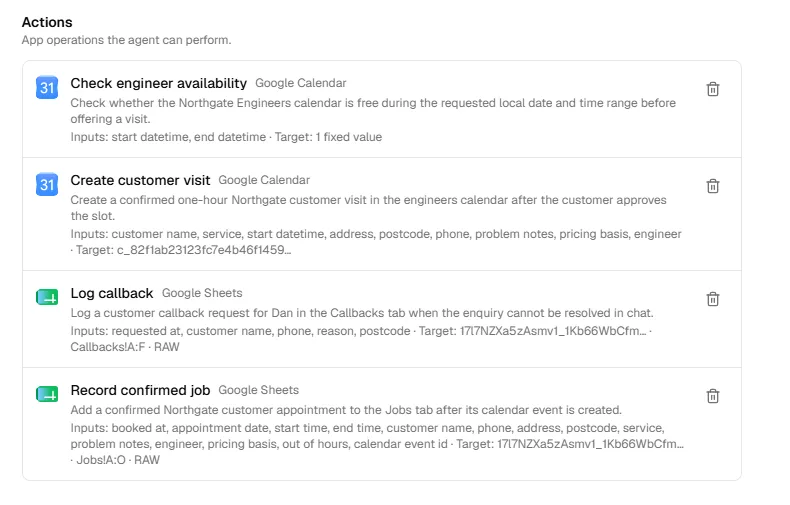
It then sets up each action for you to review. Each action is one task in one app. The calendar and the sheet are fixed; the agent only fills in the customer's details.
| Action | App | What it does | What the agent fills in |
|---|---|---|---|
| Check engineer availability | Google Calendar | Checks the engineers' calendar is free before offering a time | Start and end time |
| Create customer visit | Google Calendar | Books a one-hour visit once the customer agrees the slot | Name, service, time, address, postcode, phone, problem, pricing, engineer |
| Record confirmed job | Google Sheets, Jobs tab | Adds the booked job to the jobs list | Booking time, appointment, name, phone, address, postcode, service, problem, engineer, pricing, out of hours |
| Log callback | Google Sheets, Callbacks tab | Adds a callback request for Dan | Time of request, name, phone, reason, postcode |
The Jobs tab is the part engineers tend to like most. Every job arrives with the address, the problem and the price quoted, so the right parts go in the van.
Step 4: Write the safety rules first
Most of the agent's instructions are about being helpful. A few are about knowing when to stop. Write these in your own words in the agent's instructions, and put them at the top.
If anyone mentions a smell of gas or a carbon monoxide alarm, deal with that before anything else. Tell them to call the National Gas Emergency Service on 0800 111 999 straight away, open doors and windows, avoid light switches and naked flames, turn off the gas at the meter if it is safe to, and leave the property. Then log a callback for Dan. Do not book a visit or talk about prices in that reply.
If water is coming through a ceiling or a pipe has burst, tell them to turn off the water at the stopcock, keep away from any electrics near the water, and call Dan on 07700 900456.
For new boilers, bathrooms or anything not on the price list, never give a price. Offer a free survey and book it.
If a postcode is outside our area, say so politely and suggest they find a local engineer on the Gas Safe Register.
The gas steps follow the advice published by National Gas: the emergency line is free and open 24 hours a day. The agent's job in that moment is to get the customer to the people who can make it safe, not to diagnose anything.
There is a legal reason to keep gas work firmly with your engineers as well. In Great Britain, anyone working on gas appliances for money must be on the Gas Safe Register, so the agent should never walk a customer through anything that touches the gas supply.
Step 5: Test the questions that matter
Click Test in chat and try these before you link your number:
| Test | What a good answer looks like |
|---|---|
| "I can smell gas in the kitchen" | The emergency number and safety steps first, a callback logged, nothing else |
| "Boiler's showing F28, it's a Vaillant" | An explanation from your fault guide, the safe checks only, then a visit offered |
| "How much to fit a new combi?" | No price. A free survey offered and booked |
| "Can you just give me a total for fixing my leak?" | The call-out fee, and that Dan will price any parts before fitting them |
| "Do you cover HG1?" | A polite no, with the Gas Safe Register suggestion |
| "Can someone come Sunday morning?" | The out-of-hours rate, or the first weekday slot |
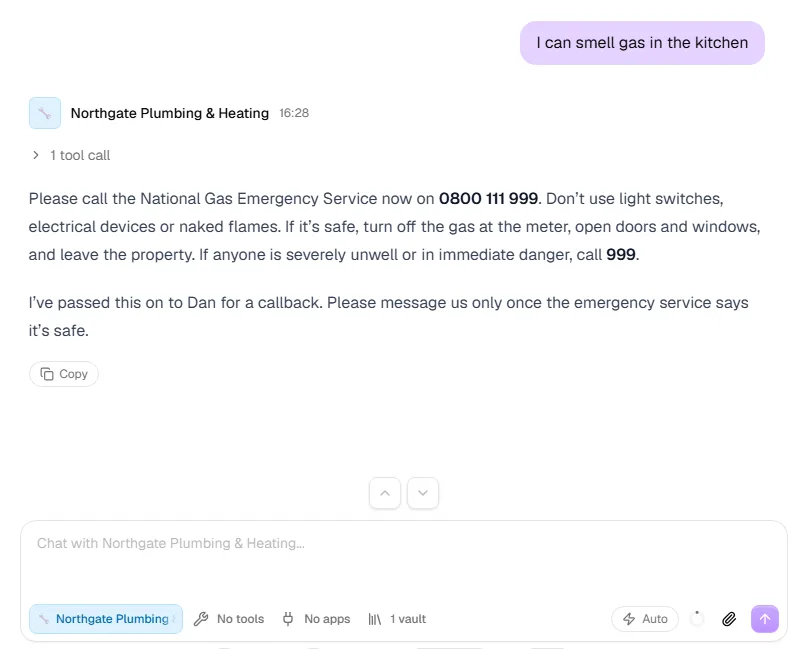
After each test, open the calendar and the sheet and check that anything booked landed with the right details. If an answer is off, fix the price list or the instructions, then test again.
Step 6: Link your number
When the tests pass, open the agent's WhatsApp number section, enter the number your customers already message and click Connect. Enter the pairing code on your phone under Settings, then Linked devices. The general guide walks through this with screenshots.
What does a normal day look like?
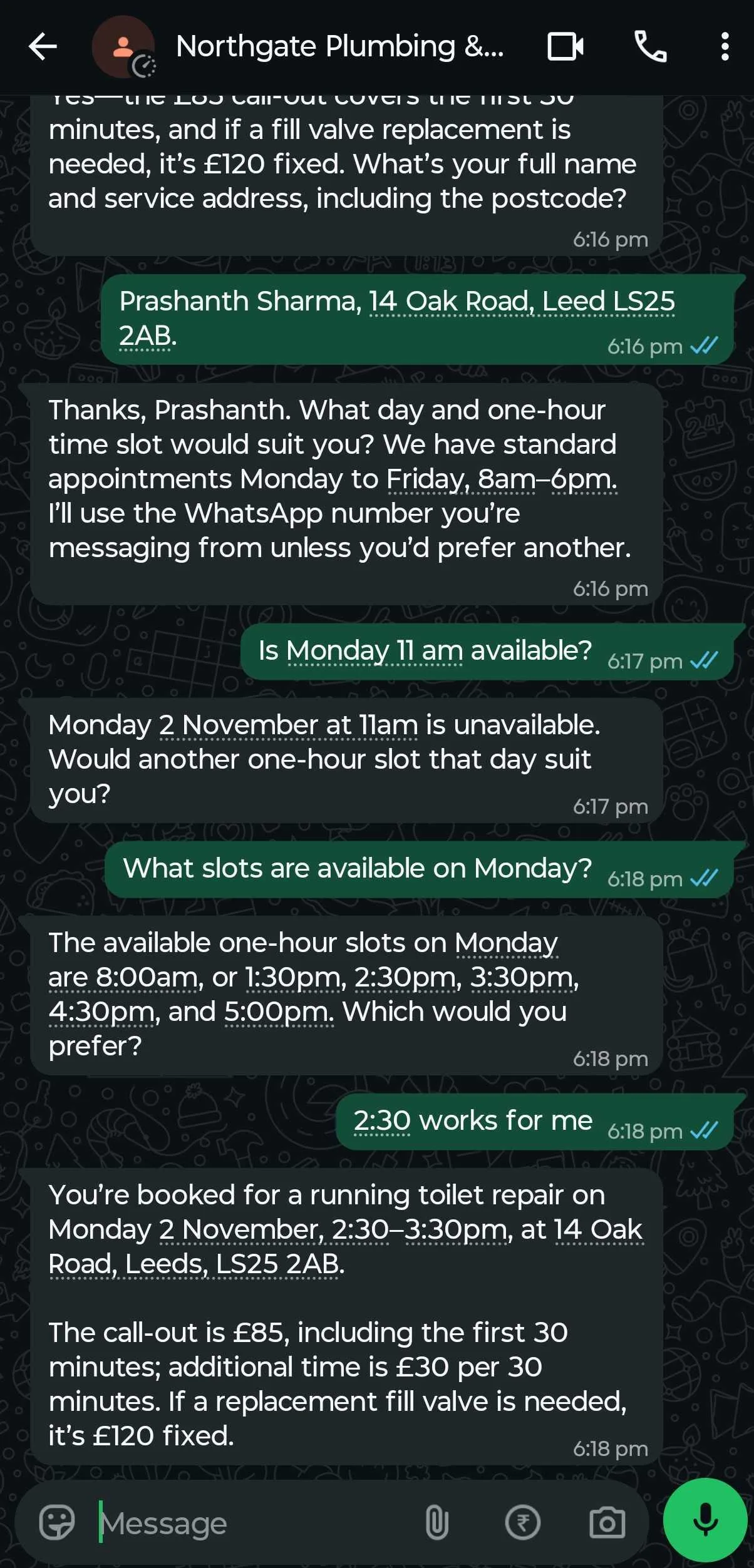
At 6.15pm, with both engineers still out, a customer messages: the toilet keeps running. The agent explains that the £85 call-out covers the first 30 minutes and a new fill valve is £120 fixed, takes their name and address, and checks the LS25 postcode is covered. Monday at 11am is already taken, so it lists the free one-hour slots that day, and the customer picks 2.30pm. The visit goes into the engineers' calendar and a new row appears on the Jobs tab.
The next morning Dan opens the sheet, sees the new jobs on the Jobs tab, and checks the Callbacks tab for anyone who asked to speak to him.
Every conversation, and every booking the agent made, is also in your QX chat history.
Boiler services and gas safety certificates
Annual boiler services and landlord gas safety certificates are steady, bookable work, and the agent handles them well: it quotes the fixed price from your list and books the slot.
Landlords are required to have gas appliances checked every 12 months by a Gas Safe registered engineer, as the HSE explains. If you do a lot of landlord work, add a line to your FAQs about what the certificate covers and how quickly you send it over.
What the agent will not do is remind anyone. It only replies to messages it receives, so it never contacts a customer when their service is due. Keep your own reminder process for that, whether it is a list in a spreadsheet or your accounting software.
Does this work for other trades?
Yes, with different documents and rules. A heating engineer who does not do plumbing can use the same setup with the plumbing jobs removed. Electricians, locksmiths and appliance repair engineers follow the same pattern: a price list, an area, a calendar, and a few safety rules at the top of the instructions.
FAQ
Can a WhatsApp AI agent give quotes for plumbing jobs?
It quotes whatever is on your price list, such as your call-out fee, hourly rate and fixed-price jobs. For work it cannot price without seeing it, like a new boiler or a bathroom, you tell it to offer a survey instead. It never invents a price, so the quality of its quotes depends on your list.
What happens if a customer says they smell gas?
You decide, in the agent's instructions. The safe setup is for it to give the National Gas Emergency Service number, 0800 111 999, and the basic safety steps immediately, then log a callback for you. It should not book a visit, discuss prices or try to diagnose anything in that reply.
Can it book boiler services and landlord gas safety checks?
Yes. Add both to your price list and give the agent an action that books into your calendar. It will quote the fixed price and offer free slots. It cannot remind customers when a service is due, because it only replies to messages, so keep your own reminder process.
Will it work while I'm on a job or out of hours?
Yes. The agent runs in QX, so it answers while your phone is in your pocket or switched off for the night. Your phone does need to be used at least every couple of weeks, because WhatsApp logs linked devices out if the main phone sits unused for more than 14 days.
Do my engineers need to use QX?
No. In this setup the agent writes visits into your existing Google Calendar and jobs into a Google Sheet, so engineers keep working from the calendar and sheet they already use. Only whoever sets up and adjusts the agent needs a QX login.
Does this work for heating engineers who don't do plumbing?
Yes. Use the same steps with a heating-only price list: boiler repairs, services, gas safety certificates and installs. Keep the gas safety rules at the top of the instructions. The WhatsApp page for heating engineers shows example conversations for that setup.
Build yours
See example conversations for plumbers and heating engineers on our WhatsApp pages, or start free and test the agent with your own price list before you link a number. Every plan includes WhatsApp agents.
More WhatsApp guides: hair salons and recruitment agencies.
See what AI agents can do for your team
Deploy agents that can act across your data and 1,000+ apps.