
How to Build a WhatsApp AI Agent for a Hair Salon
Set up a WhatsApp AI agent that quotes prices and times from your service menu, books appointments into your calendar, and moves or cancels them when clients ask.

A hair salon can let an AI agent answer its WhatsApp booking requests. When a client asks "can I get a cut and blow-dry on Saturday?", the agent gives the price and how long it takes from your service menu, checks your calendar for a free slot that is long enough, and books the one the client picks. It moves or cancels appointments when clients ask, logs each cancellation against your policy, and passes complaints and unusual requests to you. This guide builds that agent in QX step by step for a made-up salon, Ivy & Oak Hair Studio in Bristol, a one-chair salon run by its stylist, Maya.
For the basics of WhatsApp agents, start with the general guide to WhatsApp AI agents for customer service. This guide focuses on the part salons care about most: getting the right service into a slot that is long enough for it, without you picking up the phone between clients.
Key takeaways
- The service menu needs a time for every service as well as a price. The agent uses the time to find a slot long enough for the appointment.
- Six actions cover the job: five in Google Calendar to check free times and book, find, move and cancel appointments, and one in Google Sheets to log cancellations and callbacks.
- The agent always checks the calendar before offering a time, so it only suggests slots that are actually free.
- Before it moves or cancels anything, the agent finds the exact appointment and asks the client to confirm.
- "From" prices stay "from". The agent quotes the starting price and says the stylist will confirm, rather than guessing.
- Complaints, colour corrections and anything not on the menu go to you, in rules you write in your own words.
What will the agent handle?
| A client says | The agent |
|---|---|
| "Can I get a cut and blow-dry on Saturday?" | Quotes £45 and one hour, checks the calendar for a time that suits and books it |
| "Have you got anything today?" | Checks today for a gap long enough for the service they want |
| "Can you fit me in before 10 on Friday?" | Checks Friday morning and offers what is free |
| "How much are highlights for long hair?" | Quotes the "from" price and says Maya will confirm on the day |
| "Can I move Thursday's appointment to next week?" | Finds the appointment, offers free times next week and moves it once they confirm |
| "I need to cancel tomorrow at 10" | Finds the appointment, quotes your cancellation policy, cancels it once they confirm and logs it |
| "I'm not happy with my colour from last week" | Apologises, gives the salon's number and logs a callback |
What you need before you start
- Your service menu, as text, with the price and the time each service takes.
- Your Google Calendar, the one your appointments already go in.
- Your cancellation policy and opening hours.
- A Google Sheet for cancellations and callbacks.
Step 1: Describe the salon
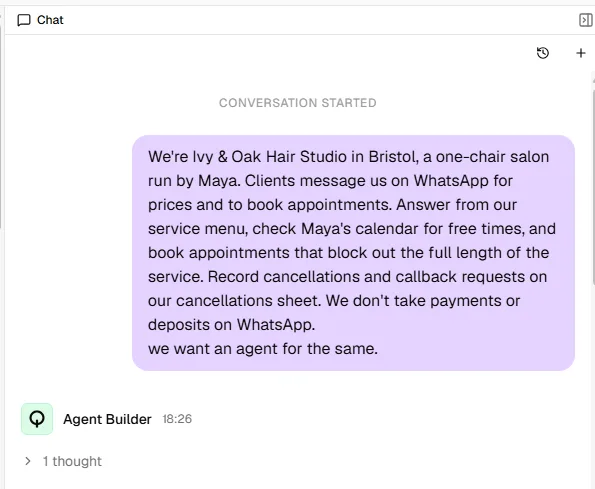
In QX, go to Agents, then New Agent, and choose External. In the Chat sidebar, describe the salon:
We're Ivy & Oak Hair Studio in Bristol, a one-chair salon run by Maya. Clients message us on WhatsApp for prices and to book appointments. Answer from our service menu, check Maya's calendar for free times, and book appointments that block out the full length of the service. Record cancellations and callback requests on our cancellations sheet. We don't take payments or deposits on WhatsApp.
QX reads your website, asks a few follow-up questions, and drafts the agent's instructions.
Step 2: Add your service menu, with times
This is the step that makes or breaks a salon agent. A price list alone is not enough, because a full head colour cannot go in a one-hour gap. Add the time for every service:
| Service | Price | Time |
|---|---|---|
| Cut and blow-dry | £45 | 1 hour |
| Blow-dry | £28 | 45 minutes |
| Restyle | £55 | 1 hour 15 minutes |
| Full head colour | £85 | 2 hours |
| Half head highlights | from £95 | 2 hours 30 minutes |
| Men's cut | £25 | 30 minutes |
| Fringe trim | £8 | 15 minutes |
An example menu for this guide.
A few lines alongside the menu save a lot of back-and-forth:
- What "from" means. "Prices marked 'from' depend on hair length and thickness. Maya confirms the price before starting."
- What you don't offer. "We don't do hair extensions or children under 8."
- Your cancellation policy. "Please give 24 hours' notice. Cancellations with less notice may be charged 50%."
- Opening hours, including late nights and bank holidays.

Step 3: Describe the six actions
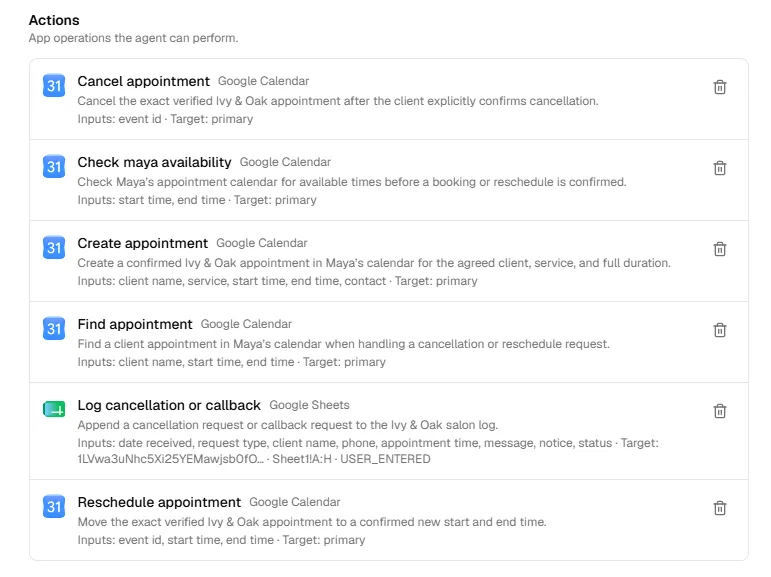
Tell the builder in the Chat sidebar what the agent should be able to do, for example "check my calendar for free times, book, find, move and cancel appointments, and log cancellations and callbacks on my sheet". It sets up each action for you to review. Each action is one task in one app. The calendar and the sheet are fixed, and the agent only fills in the details.
| Action | App | What it does | What the agent fills in |
|---|---|---|---|
| Check Maya availability | Google Calendar | Finds free times before a booking or a move | The start and end time to check |
| Create appointment | Google Calendar | Books the appointment for the full length of the service | Client name, service, start and end time, contact |
| Find appointment | Google Calendar | Finds a client's existing appointment | Client name and the times to search |
| Reschedule appointment | Google Calendar | Moves that appointment to a new time | The appointment it found, the new start and end time |
| Cancel appointment | Google Calendar | Cancels that appointment | The appointment it found |
| Log cancellation or callback | Google Sheets | Adds a row to the salon log for you to deal with between clients | Date, type of request, name, phone, appointment time, message, notice given, status |
Find appointment always comes first when a client wants to change a booking. It gives the agent the exact appointment, so Reschedule and Cancel only ever touch that one.
Then add a line to the instructions so the agent uses them in the right order:
Always check Maya's availability before offering a slot, and book the full time for the service from the menu. If the day the client wants is full, say so and offer the next day with a gap long enough. To move or cancel, find the appointment first, read it back to the client and only change it once they confirm. Log every cancellation on the sheet with how much notice was given.
If you take on a second stylist later, give them their own calendar and their own set of calendar actions, because each calendar action works on one calendar.
Step 4: Tell it when to send clients to you
A few situations need you rather than the agent. Write them into the instructions in your own words:
If a client is unhappy with a service, apologise, don't argue, give the salon number 0117 496 0123, and log a callback.
For colour corrections, extensions or anything not on the menu, don't quote. Offer a free consultation and log a callback.
If a client mentions itching, swelling or a reaction after a colour, don't give advice. Give the salon number, and suggest NHS 111, or 999 if they are struggling to breathe.
For bridal parties or groups of three or more, log a callback so Maya can plan the day.
Step 5: Test it
Click Test in chat and try these before you link your number:
| Test | What a good answer looks like |
|---|---|
| "Cut and blow-dry Saturday afternoon?" | The price and time, then free one-hour slots on Saturday afternoon |
| "Can I come Friday?" when Friday is fully booked | Says Friday is full and offers the next day with a free slot |
| "How much are highlights for really long hair?" | The "from" price and that Maya confirms on the day |
| "Can you do my colour correction?" | No quote, a consultation offered and a callback logged |
| "Can I move my Saturday 11am to next week?" | Finds the appointment, offers free times next week and moves it after the client confirms |
| "I need to cancel my 10am tomorrow" | Finds the appointment, quotes the policy, cancels it after the client confirms and logs it on the sheet |
| "Do you do extensions?" | A polite no, from your menu notes |
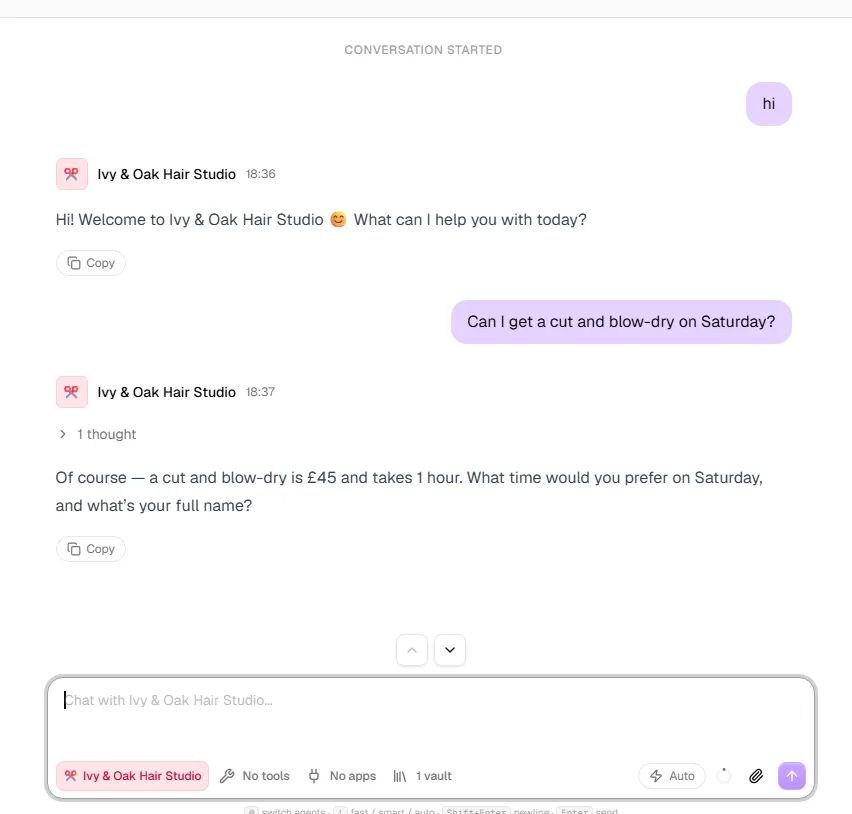
After a test booking, open your calendar and check that the appointment blocks the full time for the service. A full head colour should take two hours of the diary, not one. Then move the test booking and cancel it through the chat, and check the calendar changed each time and the cancellation is on the sheet.
Step 6: Link your number
When the tests pass, open the agent's WhatsApp number section, enter the salon's number and click Connect, then enter the pairing code on your phone under Settings, then Linked devices. The general guide shows each screen.
What does a booking look like?
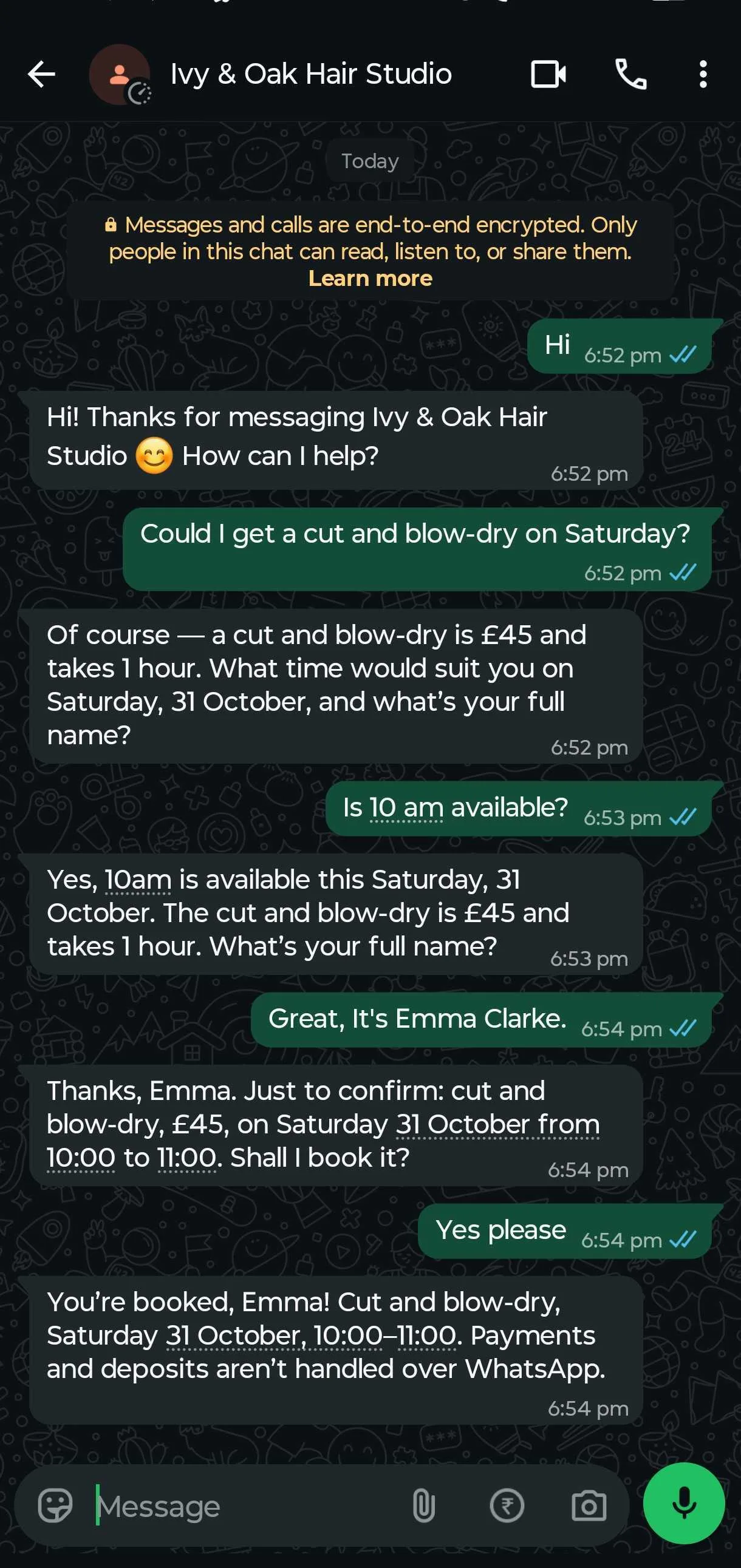
At 6.50pm, after the salon has closed, a client messages: "Could I get a cut and blow-dry on Saturday?" The agent replies with the price and time and asks what time suits. The client asks for 10am, and the agent checks Maya's calendar, confirms it is free, reads the booking back and books it once the client says yes. The appointment appears in Maya's calendar, blocking 10am to 11am, and Maya sees it the next morning before her first client.
Every conversation, and every booking the agent made, is also in your QX chat history.
A note on salon booking systems
This guide uses Google Calendar because plenty of small salons run their diary there. If your appointments live in a salon booking system instead, check whether it is among the 1,000+ integrations. The approach is the same: a service menu with times, and actions to check free times and book, move and cancel appointments.
Two things to know. The agent will not send appointment reminders, because it only replies to messages it receives, so keep your calendar or booking system's reminders switched on. And in this setup it does not take payments or deposits in the chat.
Does this work for barbers and beauty salons?
Yes. Barbers usually have a shorter menu and more walk-ins, so the menu and the "have you got anything today?" question matter most. Aesthetics clinics and tattoo studios add consultations and deposits to the rules. The structure stays the same: a menu with times, a calendar, and a few rules for what comes to you.
FAQ
Can a WhatsApp AI agent book salon appointments?
Yes. Give it your service menu with prices and times, and actions that check free times and add bookings to your calendar. When a client asks for a service and a day, it offers free slots long enough for that service and books the one they choose. Test it with a few bookings before you link your number.
What happens when the day is fully booked?
The agent checks your calendar before offering anything, so it only suggests times that are free and long enough for the service. If the day the client wants is full, it says so and offers the next day with a suitable gap. It books only slots it has just found free.
How does the agent know how long an appointment takes?
From your service menu. List a time next to every service, such as one hour for a cut and blow-dry or two hours for a full head colour. The agent uses that time to find a gap that is long enough and to block the right amount of your calendar when it books.
Can it cancel or move appointments?
Yes. When a client asks, the agent finds the appointment in your calendar, reads it back and changes it only once they confirm. For a cancellation, it quotes your policy and logs it on a Google Sheet with how much notice was given, so you can see who cancelled late. A move checks your free times first.
Can it send appointment reminders?
No. A QX WhatsApp agent only replies to messages it receives, so it never contacts clients first. That rules out reminders and marketing messages. Keep using your calendar or salon booking system for reminders, and let the agent handle the questions and bookings that come in.
Does this work for barbers and beauty salons?
Yes. The setup is the same for any business that books appointments: a menu with prices and times, a calendar, and rules for what comes to you. If more than one person takes bookings, give each their own calendar and their own set of calendar actions.
Build yours
See example conversations for hair salons and barbers on our WhatsApp pages, or start free and test the agent with your own service menu before you link a number. Every plan includes WhatsApp agents.
More WhatsApp guides: plumbing and heating businesses and recruitment agencies.
See what AI agents can do for your team
Deploy agents that can act across your data and 1,000+ apps.